SAS ID Property Tax Payment Bangalore (BBMP/GBA Online Guide 2026)


Step-by-step guide to pay BBMP/GBA property tax using your SAS ID in Bengaluru. Find your SAS ID, calculate tax, pay online, and download your receipt updated 2026 process.
Quick Summary (TL; DR)
SAS ID (Self-Assessment Scheme ID) is the unique identification number assigned to every property in Bengaluru by BBMP/GBA for property tax purposes.
You can pay BBMP/GBA property tax online using your SAS ID at bbmptax.karnataka.gov.in .
Property tax in Bengaluru must be paid by March 31 each Financial year. A 5% rebate applies if paid within that window. Miss it and interest at 2% per month starts accumulating.
This guide walks you through every step from finding your SAS ID, calculating tax, making payment, and downloading the receipt.
Understanding Usage of SAS ID in BBMP/GBA Property Tax?
Property tax in Bengaluru is paid to the BBMP (Bruhat Bengaluru Mahanagara Palike) or now called as GBA (Greater Bangalore Authority). Every property in BBMP/GBA limits has a unique number called the SAS ID. This number is what you use to identify your property, view the tax demand, and complete the payment online.
The SAS ID stumps most property owners, either they do not have it, cannot find it, or are not sure what to do with it. Missing the payment deadline compounds the problem with penalties and arrears.
Property tax in Bengaluru must be paid by March 31 each Financial year. A 5% rebate applies if paid within that window. Miss it and interest at 2% per month starts accumulating.
What Is SAS ID in BBMP/GBA Property Tax?
SAS stands for Self-Assessment Scheme. The SAS ID is the unique identification number that BBMP/GBA assigns to every property registered under its jurisdiction in Bengaluru. It is the primary reference number for all property tax-related transactions including payment, receipt download, correction, and status tracking.
When BBMP/GBA introduced the Self-Assessment Scheme, it allowed property owners to calculate and declare their own property tax based on prescribed rates and guidelines. The SAS ID was created as the unique reference for each property under this system.
Where Can You Find Your SAS ID?
On any previous BBMP/GBA property tax receipt, it appears as the Application Number or SAS Application Number
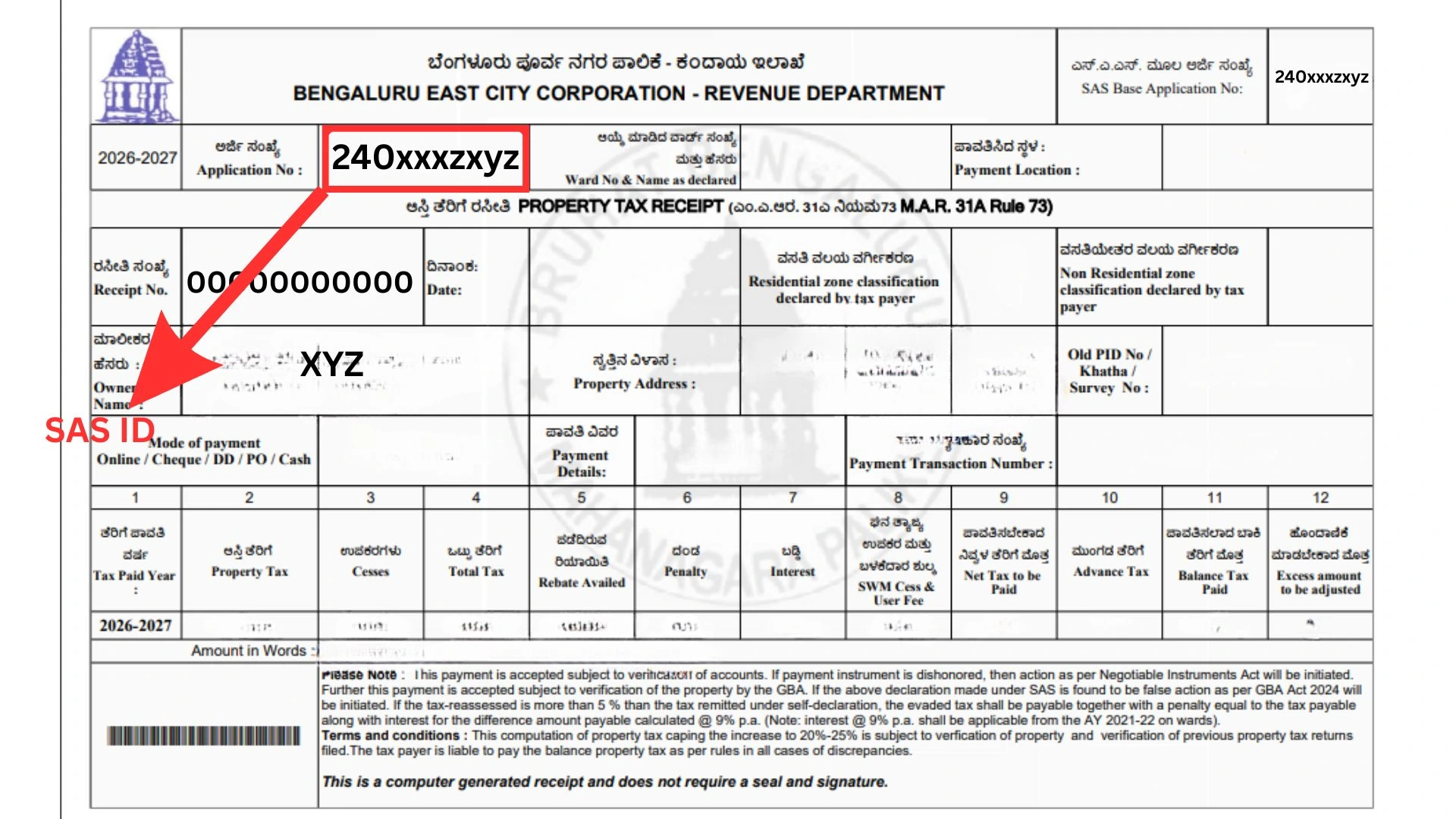
On the property tax demand notice issued by BBMP/GBA
On the BBMP/GBA property tax portal search with your property address or owner name
On the Khata certificate issued by BBMP/GBA
By visiting the nearest BBMP/GBA Citizen Service Centre with your property documents
Note: The SAS ID is also sometimes referred to as the PID (Property Identification Number) in newer BBMP and GBA systems. If you have an e-Khata, your property's PID is listed on it. Both SAS ID and PID can be used to pay property tax online.
Keep the following ready before visiting the BBMP/GBA tax portal. Having these on hand prevents the process from being interrupted midway.
What You Need | Where to Find It |
SAS ID or Application Number | Previous tax receipt, Khata certificate, or BBMP/GBA portal search |
Property address | Sale deed, Khata certificate, or previous tax receipt |
Owner name | As registered with BBMP/GBA used for portal search if SAS ID is unknown |
Payment method | Net banking, debit card, credit card, or UPI |
Email ID or mobile number | For receipt delivery after payment |
How to Pay BBMP/GBA Property Tax Using SAS ID? Step-by-Step Process
The BBMP/GBA property tax portal is available at bbmptax.karnataka.gov.in. All steps below apply to the 2026 process.
Step 1: Visit the BBMP/GBA Property Tax Portal
Open your browser and go to bbmptax.karnataka.gov.in. This is the official BBMP property tax payment portal. Do not use third-party payment websites. Always pay directly through the official portal.
Step 2: Search for Your Property Using SAS ID
The homepage has a property search option. Enter your SAS ID in the designated field and click Search.
If you know your SAS ID, enter it directly in the SAS Application Number field
If you do not know your SAS ID, use the owner name or property address search option to locate your property
Step 3: Verify Property Details
Once the search results appear, verify the following details before proceeding:
Owner name: confirm it matches the registered owner
Property address: confirm it matches your property location
Ward number: Confirm the correct ward is displayed
Property type: residential, commercial, or mixed use
Important: If the details displayed are incorrect, wrong owner name, a wrong address, or wrong property type, do not proceed with payment. Contact BBMP/GBA to correct the records first. Paying on incorrect details does not correct the underlying record.
Step 4: View Tax Calculation and Demand
After verifying the property details, the portal will display the tax calculation for the current financial year and any outstanding arrears from previous years.
Current year tax: the property tax due for the 2025-26 financial year
Arrears are any unpaid tax from previous years, plus interest at 2% per month
Rebate 5% rebate is shown if payment is made between April 1 and April 30
Total amount payable sum of current year tax, arrears, and any applicable penalty
The 5% rebate on BBMP/GBA property tax applies only when payment is completed between April 1 and April 30 of the financial year. After April 30, the full amount plus interest applies.
Step 5: Proceed to Payment
Once you have verified the tax details and the total amount, click the Proceed to Payment button. You will be taken to the payment gateway.
Select your payment mode: net banking, debit card, credit card, or UPI
Complete the payment through your bank's payment gateway
Do not close the browser window or refresh the page during payment processing
Step 6: Confirm Payment and Get Acknowledgement
After successful payment, the portal will display a payment confirmation screen with a transaction ID and an acknowledgement number.
Note the transaction ID and acknowledgement number immediately. These are required if any payment discrepancy needs to be resolved later
Step 7: Download the Property Tax Receipt
After payment confirmation, download the official BBMP/GBA property tax receipt. This is your proof of payment.
Click the Download Receipt button
The receipt will be generated in PDF format
Save the PDF to your device and email it to yourself for records
If the receipt is not available immediately, give it 24 hours. Log back in and download it from the Payment History section.
Tip: Do not discard property tax receipts. Keep them for a minimum of 7 years. Khata transfers, registration, home loans, and legal disputes all require proof of consistent tax payment.
How to Find Your SAS ID if You Have Lost It
Ways to retrieve lost previous tax receipts and SAS ID:
Option 1: Search on BBMP/GBA Tax Portal
Visit bbmptax.karnataka.gov.in
Click on 'Search by Owner Name' or 'Search by Property Address'
Enter the owner's name as registered with BBMP/GBA and the ward number
The portal will display matching properties.
Identify yours and note the SAS ID
Option 2: Check Your e-Khata or Khata Certificate
Your e-Khata or BBMP/GBA Khata certificate contains the property's PID (Property ID), which is linked to the SAS ID. You can use the PID on the tax portal to find the associated SAS ID.
Option 3: Visit BBMP/GBA Citizen Service Centre
No results online? Visit the nearest BBMP/GBA Citizen Service Centre or your area's Zonal Office. Carry your sale deed, Khata certificate, and identity proof. The staff can pull your SAS ID from the records directly.
What Is the BBMP/GBA Property Tax Due Date and Penalty?
Payment Period | Applicable Rate | Details |
April 1 to April 30 (2026) | Full tax with 5% rebate | Pay in one shot to avail the rebate |
April 1 to April 30 (half yearly) | Half yearly installment | Pay 50% by April 30 and 50% by October 31 |
After April 30 | Full tax without rebate | Rebate lapses after April 30 |
Arrears (previous years) | 2% interest per month | Calculated from the date of default |
Non-payment for multiple years | Penalty + legal action | BBMP/GBA can attach and auction the property |
Missing the April 30 deadline does not just mean losing the 5% rebate. Outstanding arrears attract 2% interest per month. On a Rs 20,000 annual tax, that is Rs 400 every month the payment is delayed.
What Are the Common Issues During SAS Property Tax Payment?
SAS ID Not Found on Portal
Common reasons: property not yet digitised, Khata not transferred after a recent purchase, or a spelling error in the owner name. None of these can be fixed online. Visit the nearest BBMP/GBA Citizen Service Centre with your property documents.
Payment Successful, but Receipt Not Generated
This is a common portal issue. If the payment is debited from your account but no receipt is generated, wait 24 to 48 hours and log back in to the portal. Go to Payment History and download the receipt. If it still does not appear, contact BBMP/GBA helpline with your transaction ID and bank statement.
Wrong Tax Amount Displayed
If the tax amount shown on the portal appears incorrect, do not pay. The amount may be wrong due to an incorrect property type classification, wrong area measurement, or a clerical error in BBMP/GBA records. File a correction request before making the payment.
Property Showing Arrears You Did Not Incur
Sometimes arrears appear for years when tax was already paid. This can happen if a previous payment was made offline and not updated in the digital records. Carry your old physical receipts to the BBMP office to get the records corrected before the current year's payment.
How Vault Proptech Helps With BBMP/GBA Property Documentation
BBMP/GBA property tax compliance in Bengaluru is one part of the larger picture of keeping your property records clean in Bengaluru.
Vault Proptech assists property owners across Bengaluru and Karnataka with:
Khata transfer and BBMP/GBA property record updates
e-Khata application assistance and status follow-up
Property due diligence, including tax arrears verification
Correction of property records, owner name, area, and classification
Encumbrance Certificate verification and title deed checks
Keep your property records clean and compliant. Get assistance with Vault.