How to Download BBMP/GBA Property Tax & Receipt (2026 Guide)

Learn how to Download BBMP/GBA property tax online and pay your BBMP/GBA tax receipt easily. Step-by-step guide with PID details, payment process, and receipt download steps.
Quick Summary: (TL; DR)
Paying the BBMP/GBA property tax and completing the BBMP/GBA tax receipt download process is now easy through the online portal. Property taxpayers in Bengaluru can now pay online and instantly access their BBMP/GBA tax paid receipt download without visiting offices. The complete process is provided below in a step-by-step manner.
What is BBMP/GBA Property Tax?
Property tax in Bruhat Bengaluru Mahanagara Palike (BBMP/GBA) is the tax levied every year on people in the city of Bengaluru. This tax is utilized for the development of infrastructure in the city. Payment of tax at the appropriate time is essential for the development of cities. If the tax is not paid at the appropriate time, there are legal implications for the people.
BBMP/GBA Property Tax Overview
BBMP/GBA follows a Self-Assessment Scheme (SAS) where property owners calculate and pay their own tax.
Feature | Details |
Payment Mode | Online payment available |
Receipt | Instant receipt download |
Payment Options | UPI, Net Banking, Debit/Credit Card |
Applicability | Applicable for all property types in Bengaluru |
Details Required to Pay BBMP/GBA Tax
Before starting, keep these details ready:
PID Number / SAS Application Number
Owner Name
Property Type & Usage
Previous tax details (if any)
How to Pay BBMP/GBA Property Tax Online
The online system allows users to complete payments quickly and later access their BBMP/GBA tax paid download anytime.
Step 1: Visit BBMP/GBA Official Portal
Open the BBMP/GBA property tax website.
Step 2: Enter Property Details
Select EPID / SAS Number
Enter your details
Click on Retrieve
Step 3: Verify Information
Check property details carefully
Confirm tax calculation
Step 4: Calculate Tax
System auto-calculates tax
Check for rebate eligibility
Step 5: Make Payment
Choose UPI / Net Banking / Card
Complete payment
Also Read: How to BBMP/GBA Property tax in Bangalore (Offline Process)
How to Download BBMP/GBA Property Tax Receipt
After payment, users can easily proceed with download BBMP/GBA tax receipt steps to get proof of payment.
Step 1: Opening the Receipt Download Page
Open the official website of the BBMP/GBA property tax
Search for the option ‘Download Receipt’
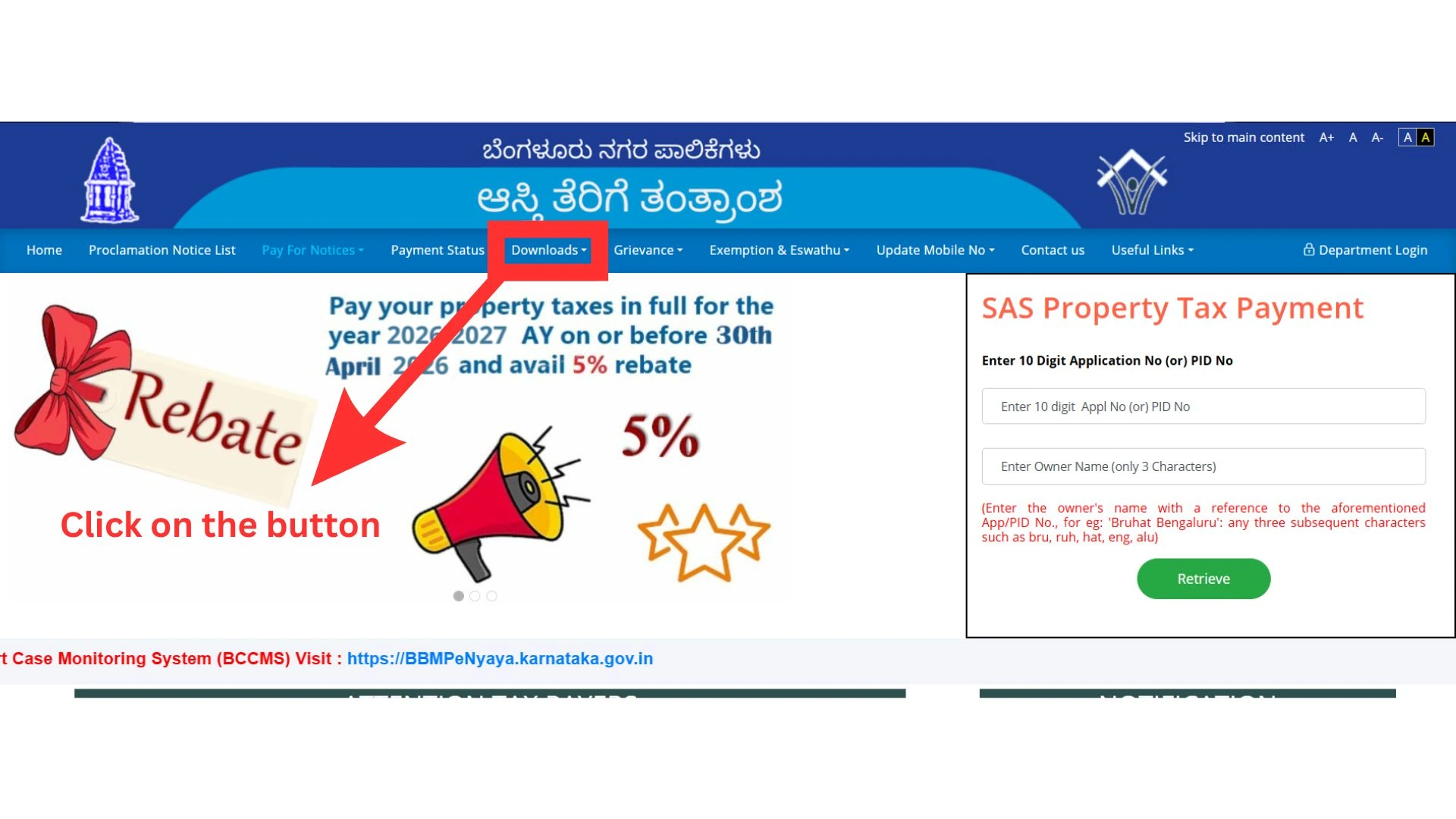
Click on the option to open the "Receipt Print
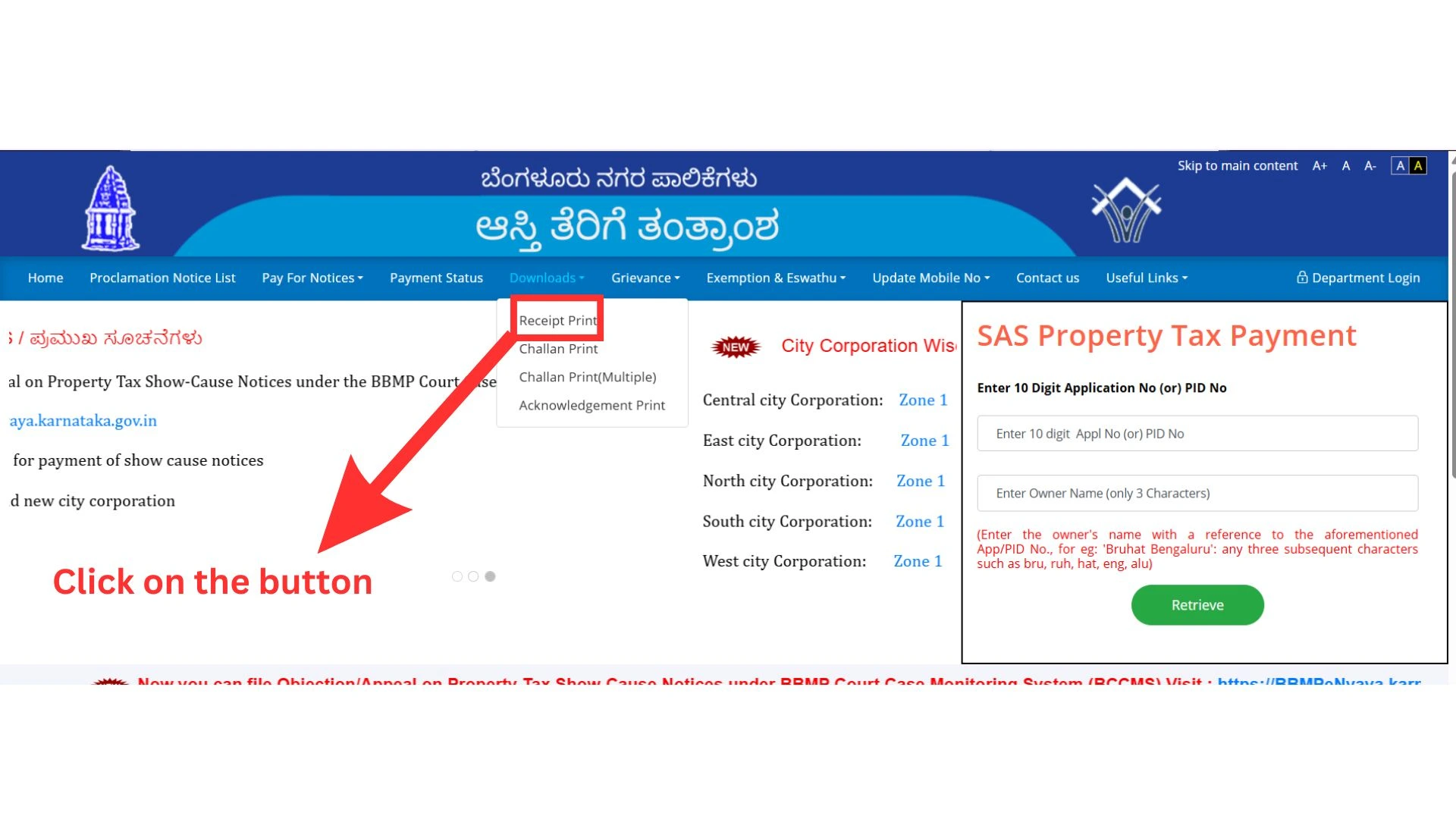
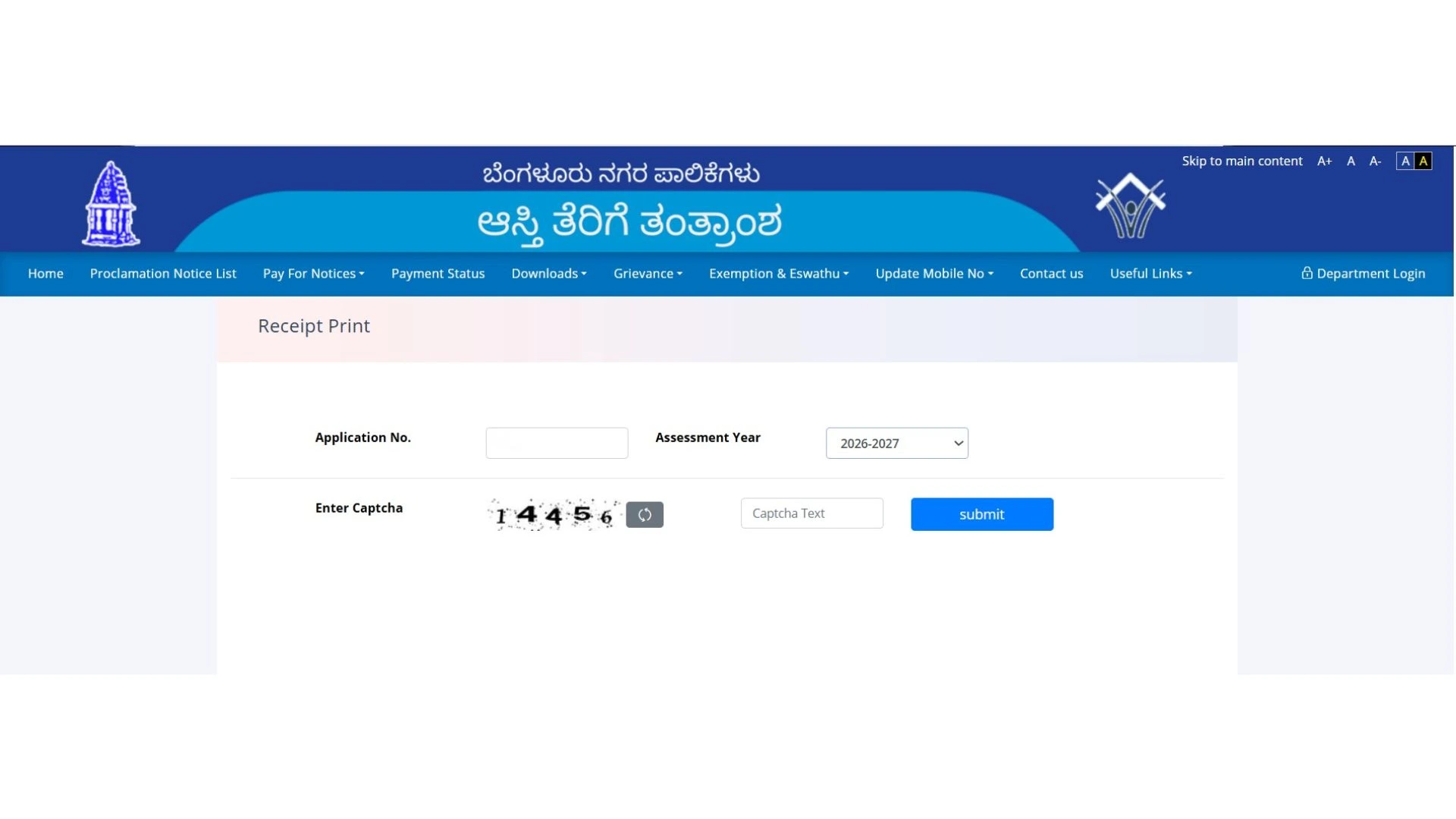
Step 2: Entering the Details
Enter the SAS Application Number
Select the Assessment Year
Also Read: How to Identify SAS ID of your Property in Bangalore?
Verify that:
The entered SAS number is correct
The selected Assessment Year matches the Payment Year
Step 3: Fetch Receipt
Click on “Fetch” or “Submit”
The system will display your receipt details
If not visible:
If payment is recent, wait for some time
Verify your details
Step 4: Verify Details
Owner’s name
Property details
Amount paid
Transaction ID
Date of payment
Verify all your details correctly before downloading
Step 5: Download Receipt
Click on “Download” or “Print”
The receipt will open in PDF format
Save it on your device
Recommended:
Keep it in soft copy format
Take a printout for record purposes
Step 6: Re-Download Anytime
If you lose the receipt, you can download it again anytime by repeating the same steps.
The BBMP/GBA system allows:
Multiple downloads
Access to previous year receipts
Key Features of BBMP/GBA Online Tax System
The online tax system provided by Bruhat Bengaluru Mahanagara Palike makes it easy, fast, and transparent for citizens to pay their property tax. Property owners can pay their tax at any time, skip long queues, and obtain an instant receipt for future purposes.
Instant Receipt Generation
Easy Online Access
Transparent Tax Calculation
Secure Payment Options
24/7 Availability
Common Issues & Solutions
While carrying out the process of paying the property tax or downloading the receipt from the official website of Bruhat Bengaluru Mahanagara Palike (BBMP), some minor technical problems might be faced by the user. The problems that might be faced during the process are minor and can be easily overcome by taking the steps given below.
1. PID Not Working
If your PID number does not give any results, it may be that your PID number is not correctly input or that it may not have been updated in the system.
Please re-enter your PID number or use your SAS application number.
2. Payment Not Updated after Deduction
There are instances where the payment may have been deducted, but it does not show up in the account as the server may not have updated it. Please wait for a period of 24-48 hours before proceeding.
3. Unable to Download Receipt
This could be due to certain issues with the browser or maybe due to a timeout. You may refresh your page or even try it on another device.
4. Incorrect Property Details Showing
Incorrect details might be outdated or might be shown incorrectly. The user needs to check the details and contact BBMP/GBA.
5. Website Not Loading or Slow
High traffic could be experienced during peak deadlines. Visit the website at non-peak hours or use a stable internet connection.
Benefits of Paying BBMP/GBA Tax Online
Payment of property tax through Bruhat Bengaluru Mahanagara Palike's online portal is an efficient and effective method for people. This method saves time and effort as people don’t need to visit the office, and it also helps in quick access to payment records.
Saves time and effort
No need to visit office
Instant proof of payment
Easy record tracking
Secure transaction
Important Tips
Making property tax payments through Bruhat Bengaluru Mahanagara Palike is quick and hassle-free if done properly. Following are some important tips that would be helpful in avoiding errors and saving time.
Pay before deadline to get rebate
Always download and save receipt
Double-check property details
Keep PID handy for future use
Conclusion
BBMP/GBA Property Tax Payment and Receipt Download is a fast and easy process. If you follow the right steps, you can complete your payment in just a few minutes. You can also use services like Vault Proptech to make your payment process more secure. Always store your tax documents safely.