How to Download E-Khata Online in Karnataka (2026 BBMP/GBA Guide)
Learn how to download e Khata online in Karnataka through BBMP/GBA and Panchayat portals. Simple steps and fees. (2026 Guide)
Quick Summary (TL; DR)
E-Khata is the digital property record required in Karnataka for tax payment, home loans, registration, and BESCOM connections. Property owners can download it online through BBMP/GBA or Panchayat E-Aasthi portals using EPID or property details. The document is legally valid, digitally signed, and usually available instantly if records are correct.
What Is e-Khata and Why Is It Important?
E-Khata is the electronic version of the Khata certificate and extract. It records property ownership, location, size, and tax assessment details in a digital format.Property owners in Karnataka are increasingly required to access e-Khata for tax payment, utility connections, bank loans, and property registration. The e-Khata is a digital property account maintained by local authorities such as BBMP/GBA and Gram Panchayats.
Why e-Khata matters:
Required for BBMP/GBA property tax payment
Needed for home loans and resale
Mandatory for BESCOM power connection
Used during property registration and verification
In many urban areas, physical Khata documents are no longer issued for new applications.
Also Read: How to get E-Khata in Bangalore (BBMP/GBA Guide).
How to Download e-Khata Online in Karnataka?
The process depends on where your property is located. Urban properties fall under BBMP/GBA, while rural properties come under Panchayat.
How to Download BBMP/GBA e-Khata Online?
BBMP/GBA properties use the E-Aasthi portal.
Step-by-Step: BBMP/GBA e-Khata Download
Visit the official BBMP E-Aasthi portal (https://bbmpeaasthi.karnataka.gov.in/office/frmKhathaDownload.aspx)
Enter your EPID number and click Search.
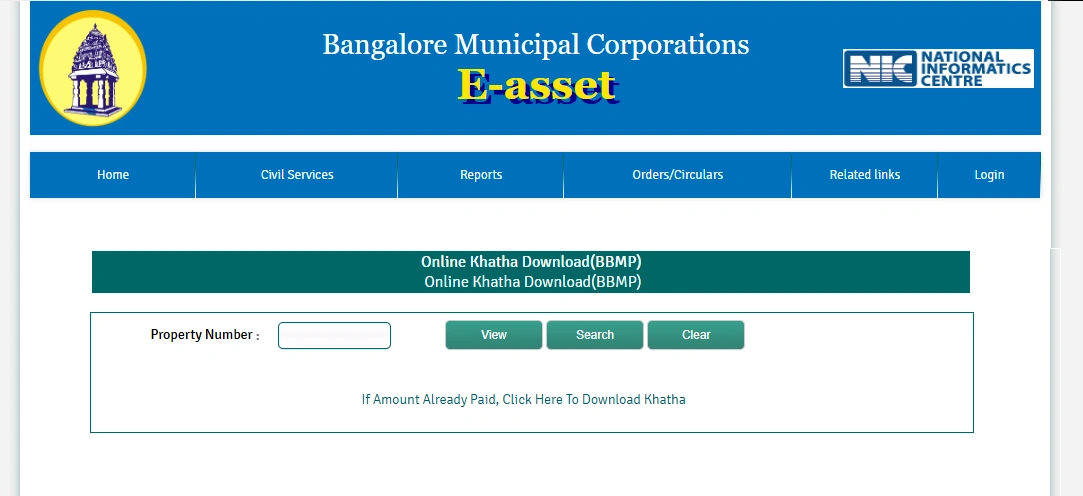
Verify details of the property and click to pay Khata Mutation.
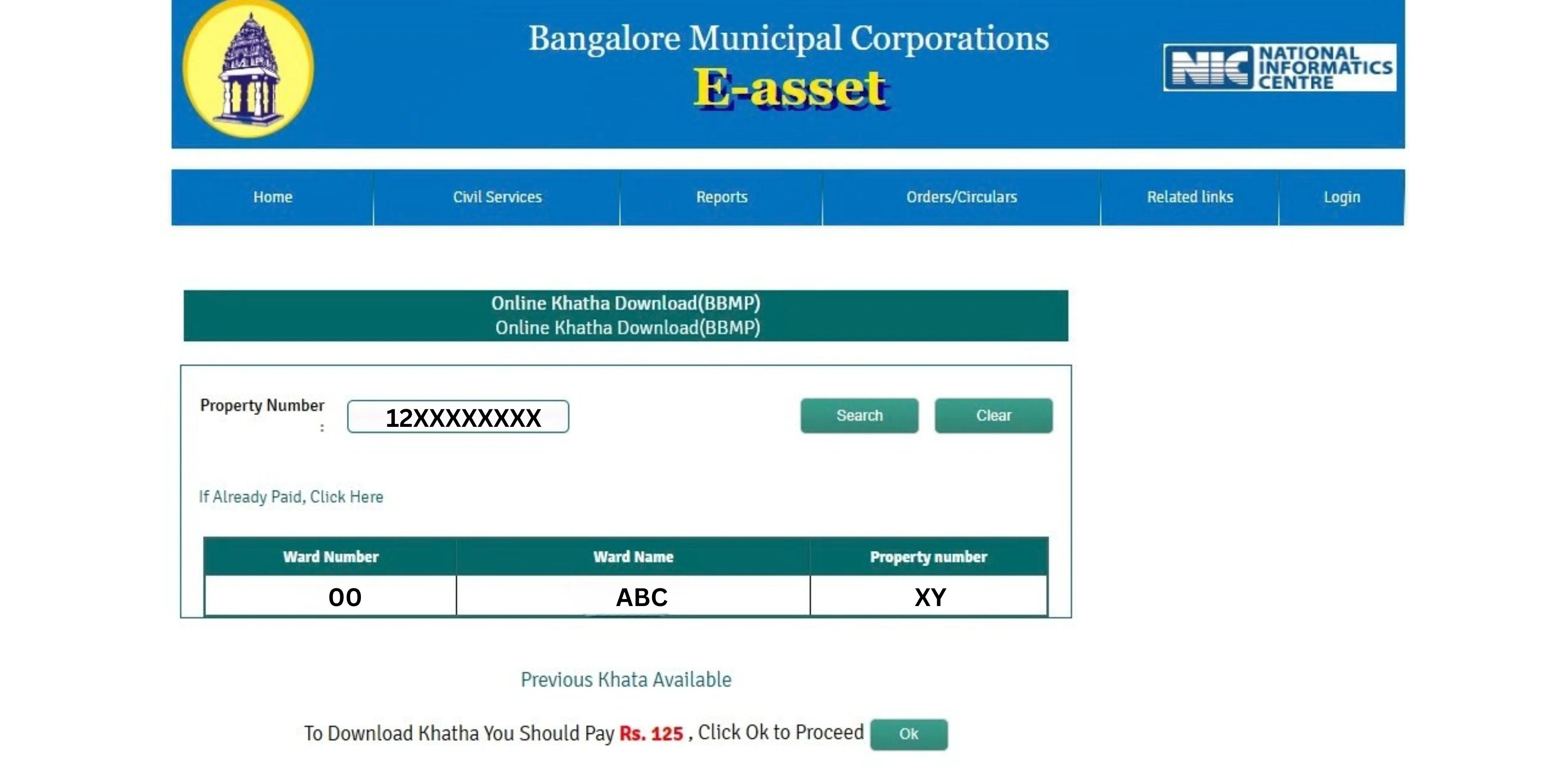
If Already Paid you can download “Previous Khata”.
If not Download the e-Khata PDF by Paying Mutation Fee of ₹125.
The file is issued in digitally signed format and is legally valid.
How to Download e-Khata in Bangalore City?
For Bangalore properties:
BBMP/GBA areas → Use E-Aasthi BBMP/GBA portal
Village or converted layouts → Check Panchayat or Urban Local Body records
Always confirm jurisdiction before applying.
e-Khata Download PDF File Not Opening?
Common Reasons
PDF reader is outdated.
Site Issue.
If you are not able to download E-Khata try using other browsers or wait till the site is working properly (Usually If the Site is Crashed, it will be take 6 to 8 Hours to rework).
What Is the Fee for Downloading e-Khata in Karnataka?
Fee for Downloading e-Khata is ₹ 125.
If the Mutation Fee is not paid earlier then additional mutation fee should be paid at the time of downloading e-Khata (Based on the property sites).
Avoid intermediaries promising faster approvals.
How to Check e-Khata Status Online?
You can track status using: EPID number. Status updates show draft, under verification, or final e-Khata.
Is e-Khata Legally Valid?
Digitally signed
Accepted by banks
Valid for registrations and utilities
Common Mistakes to Avoid During e-Khata Download
Using incorrect EPID.
Downloading draft instead of final Khata.
Ignoring mismatch in owner name or area.
Not saving payment receipt.
Errors should be corrected before using the document.
How Vault Proptech Helps Property Owners
Understanding portals, jurisdictions, and document accuracy can be confusing. Vault Proptech helps homeowners verify property records, identify gaps, and coordinate with the concerned authorities for compliant documentation.
Next Step
Once your e-Khata is downloaded and verified, the next documentation stage usually involves BESCOM power connection formalities. Ensuring document accuracy at this stage helps avoid delays.
Get your Property Secure Today with Vault legal Property Documentation Service.